ThunderWave plugins · For VirtualDJ

What an interface can't do,
a plugin does.

A VirtualDJ interface can only use the commands VirtualDJ already has. When what we needed didn't exist, we programmed it: our own audio plugins, written in C++, that live inside VirtualDJ and work hand in hand with the interface.
EQ PRO plugin window over ThunderWave DJ PRO
4 + 1plugins and a program of our own
C++on the official VirtualDJ SDK
Includedin the editions that use them
CHECKa button that confirms they're installed
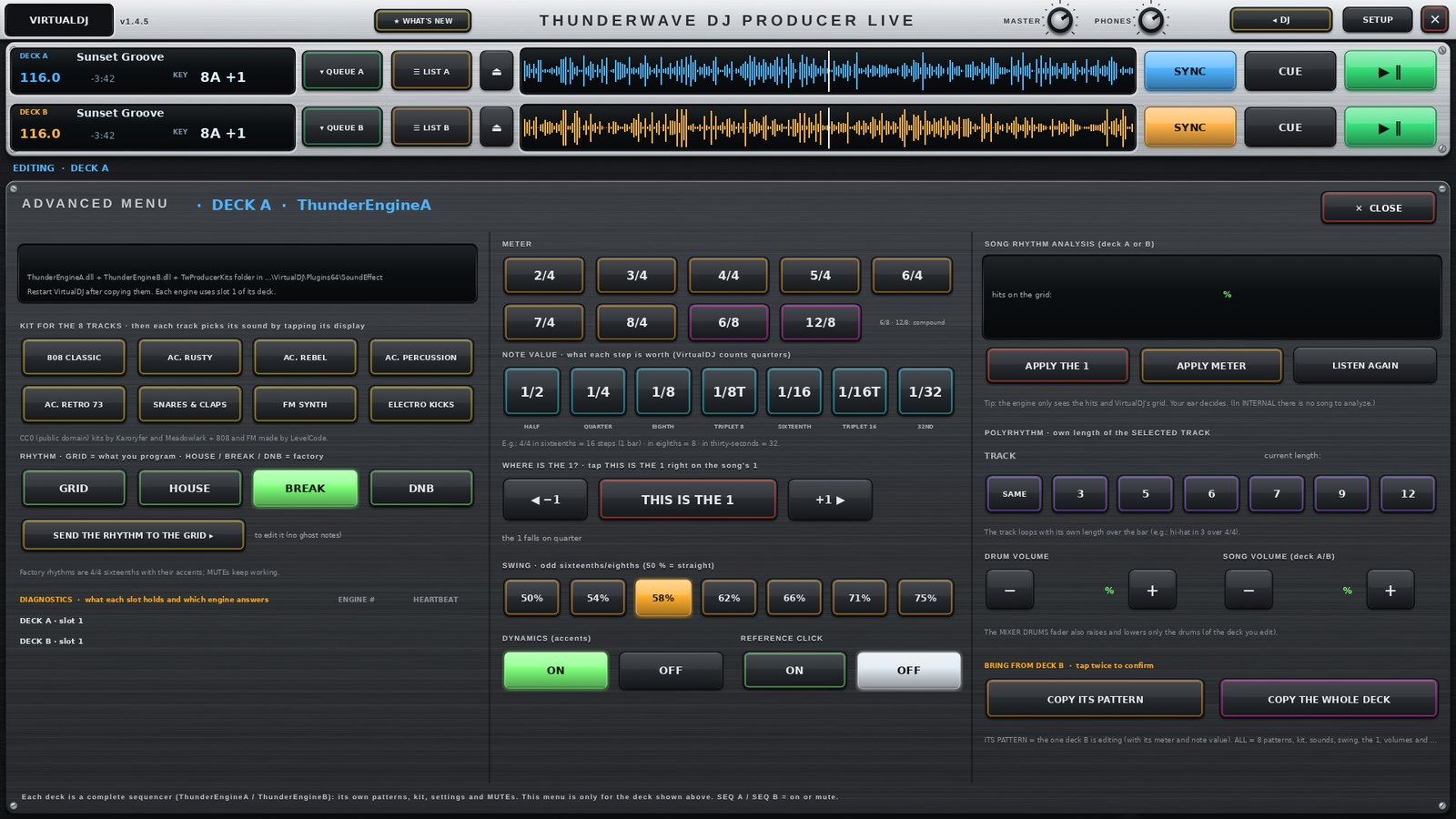
ThunderEngine running the PRODUCER LIVE sequence inside VirtualDJ
ThunderEngine In PRODUCER LIVE 1.4.5

The engine that fires
every sample on time.

VirtualDJ has no step sequencer, so we wrote one. ThunderEngine runs one per deck, follows the song's real position and fires every sample on the exact sample of its step.

  • Sample‑accurate. it follows the song's pitch, scratch, loops and jumps, or its own clock at the BPM in INTERNAL mode
  • Samples in memory. it loads the 8 kits and your WAVs from 8 to 32 bits, at any sample rate
  • It listens to the song. it suggests the meter, the subdivision and where the 1 falls
  • LINK. it shares the tempo with Ableton Link over the network, both ways
  • DMX lights. it fires up to 8 fixtures over Art‑Net on each track's exact hit, with tempo effects
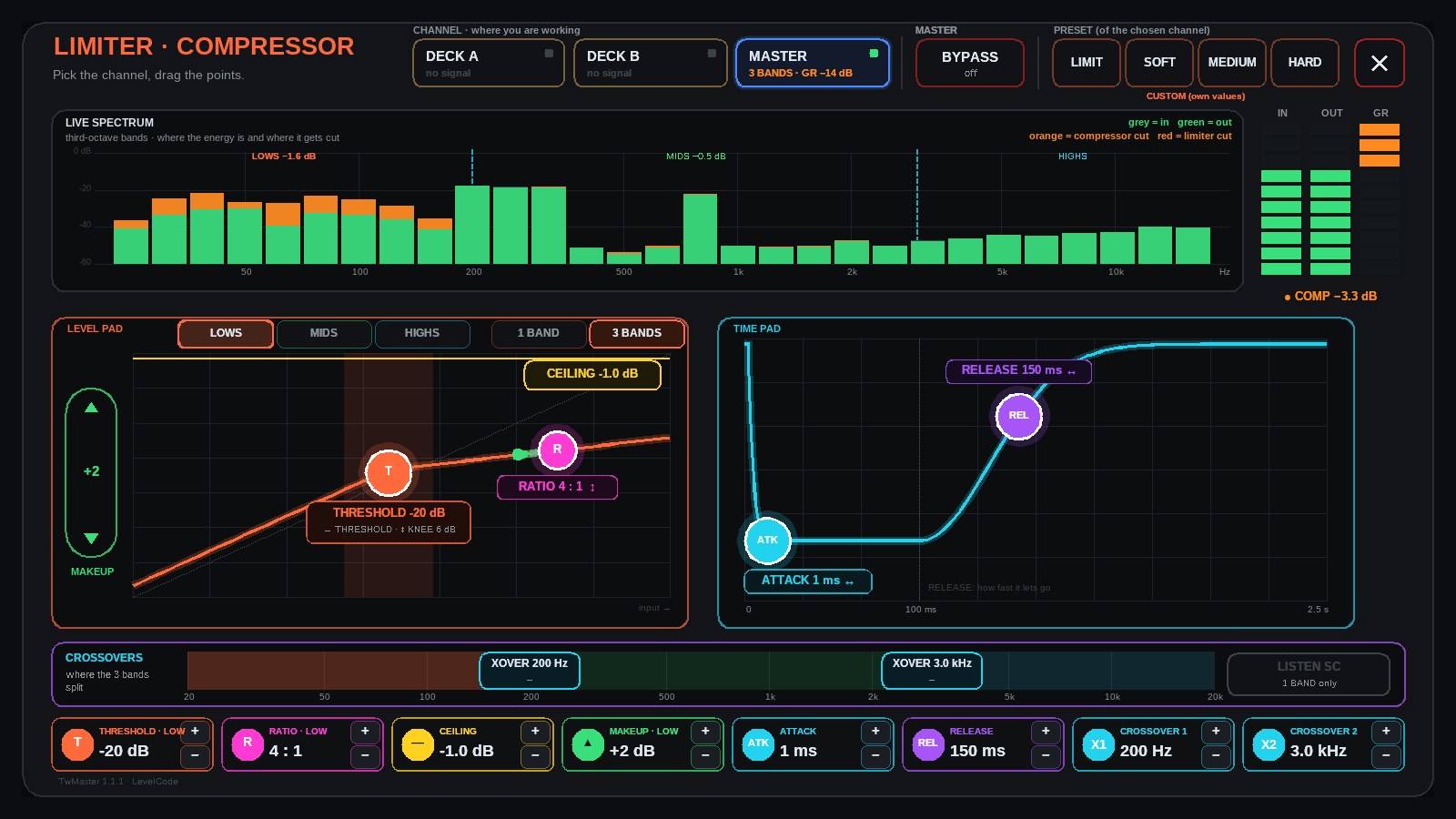
TwMaster LIMITER · COMPRESSOR window
TwMaster · LIMITER In PRODUCER LIVE 1.4.5

Limiter and compressor
for A, B and MASTER.

TwMaster looks after the output: by default it just limits at −1 dB so nothing goes over. Its window shows the live spectrum and lets you compress each channel with touch pads.

  • Three channels. DECK A, DECK B and MASTER, each with its live gain reduction
  • Live spectrum. in third‑octave bands: where the energy is and where it gets cut
  • 1 or 3 bands. full‑band compressor with HP / LP sidechain, or lows, mids and highs with their crossovers
  • Touch pads. THRESHOLD and RATIO on the level pad; ATTACK and RELEASE on the time pad; presets and an exact BYPASS
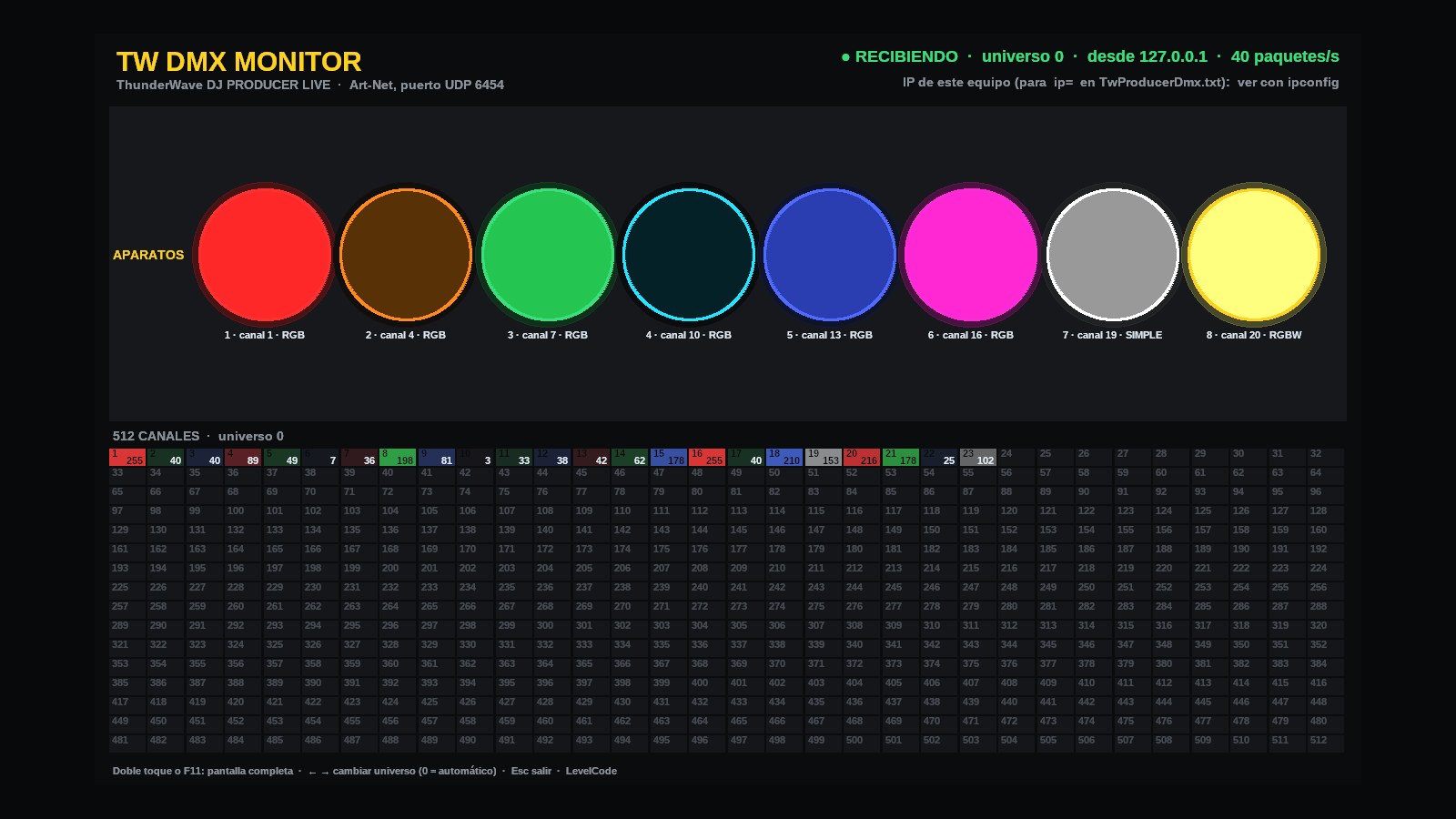
TW DMX Monitor showing PRODUCER LIVE's lights
TW DMX Monitor Included with PRODUCER LIVE 1.4.5

Test the lights
without any lights.

A single‑file Windows program that receives what PRODUCER sends over Art‑Net and draws it: each fixture as a spot with its color, and the 512 channels with their value.

  • No install. open it and it listens; it runs on the same computer or another one on the network
  • It tells you what arrives. the computer's IP, where the signal comes from and packets per second
  • Full screen. double tap or F11, to leave it on a second screen
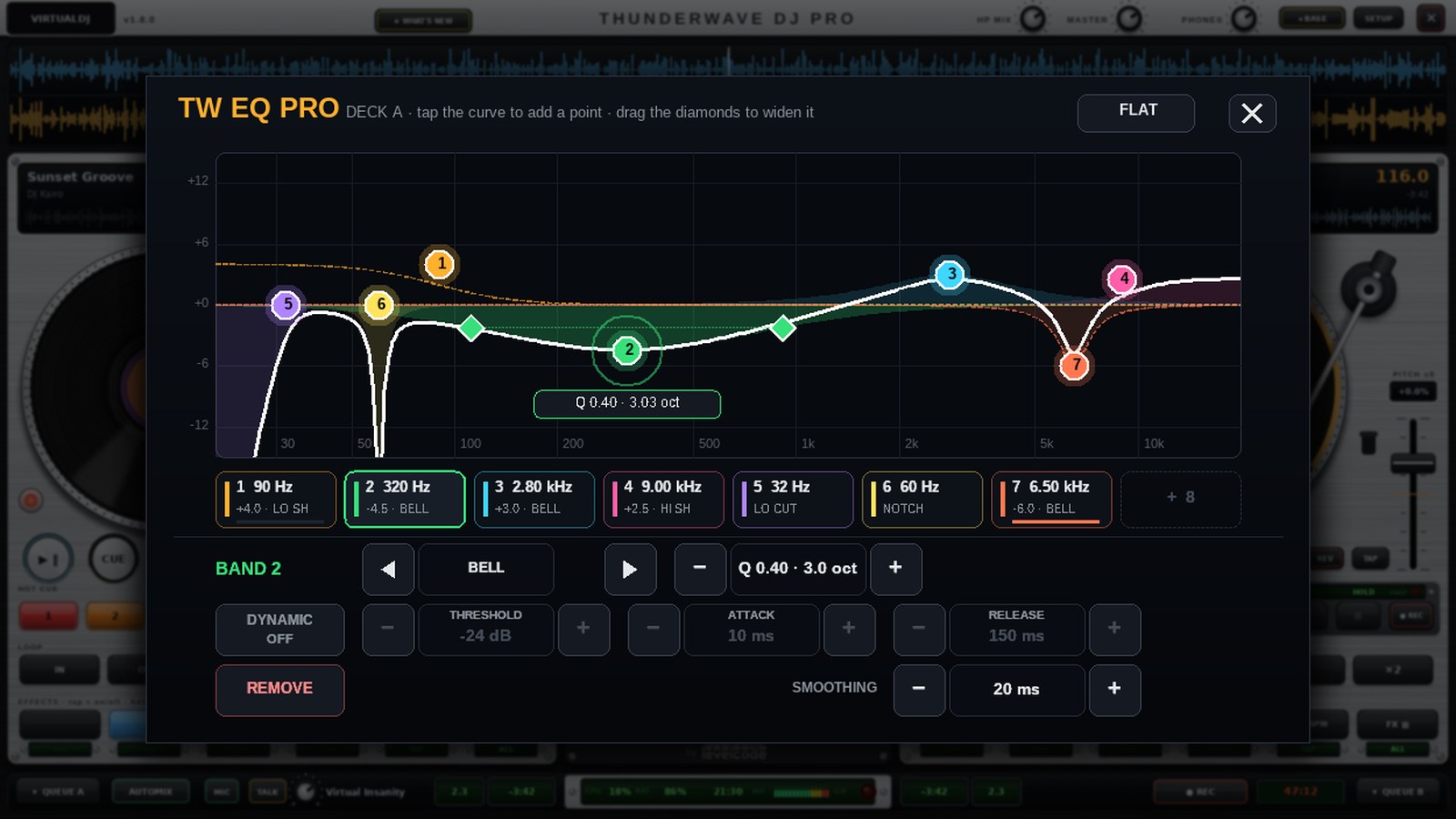
EQ PRO plugin window with the real curve
EQ PRO In PRO, PERFORMANCE and PRODUCER LIVE

Two parametric equalizers,
one per deck.

An interface can only draw buttons and images: it can't plot a curve that changes. That's why EQ PRO is a plugin with its own window, where you see the sum of every band, add points by tapping the curve and drag them with your finger.

  • Two parametric EQs, one per deck. one for deck A and one for deck B, independent: each with its own window, curve and settings
  • Up to 8 bands each. bell, shelves, low and high cuts of 12, 24 or 48 dB per octave, and notch
  • Widen and narrow each point. two diamonds beside the point change its width, with the Q and octaves in sight
  • Dynamic per band. the band acts only when its range goes over the threshold, with its own attack and release
  • Full range. 20 Hz to 20 kHz, ±15 dB and 4.3 to 0.18 octaves wide; bells keep their shape near 20 kHz
  • No clicks. changes glide (adjustable smoothing) instead of jumping
  • Still on the mixer. in EQ PRO mode, the HI · MID · LOW knobs move its bands
7–13 msfrom finger to VirtualDJ, measured on our test machine with TOUCH on
TOUCH In PRO, PERFORMANCE and PRODUCER LIVE

Less input lag
on touchscreens.

Windows waits to see if your touch is a gesture (press and hold, flick) before passing it on. TOUCH removes that wait from the VirtualDJ window: pads and buttons respond as soon as your finger lands.

  • No Windows gestures. it turns off press‑and‑hold, flicks and touch circles, only inside VirtualDJ
  • Measured. in our tests, the touch reached VirtualDJ 7 to 13 ms after the finger
  • Leaves your system alone. it doesn't change Windows settings: when VirtualDJ closes, everything is as it was

Requirements and installation

  • 64‑bit VirtualDJ on 64‑bit Windows 10 or 11. No Mac version for now.
  • They're installed by copying the files into VirtualDJ's plugins folder, with VirtualDJ closed. Step by step in the README that comes with the plugins; for PRODUCER LIVE, in the install guide.
  • EQ PRO and TOUCH are optional: without them, PRO and PERFORMANCE work with VirtualDJ's classic EQ.
  • ThunderEngine is required for PRODUCER LIVE and comes with its 8 kits and TwMaster (the limiter).
  • LINK and DMX LIGHTS use the local network: the first time Windows may ask for permission; allow it on a private network. Lights go out over Art‑Net (an Art‑Net node or interface is needed).

See PRO   See PERFORMANCE   See PRODUCER LIVE